


Training an object detector
Object detection is the task of finding objects into an image and labeling them.
The output of an object classifier is a list of objects with for every detected object:
Coordinates of the bounding box that encloses the object. A bounding box is described as two points, the
top-left cornerand thelower-right cornerof a a rectangle bounding box.Estimated label for the object, e.g. cat
Data format
Object location text file format (required for every image):
<label> <xmin> <ymin> <xmax> <ymax>
Example of object location text file for the image below

file bbox_img_3333.txt
1 3086 1296 3623 1607
1 2896 1340 3205 1539
1 2519 1326 2694 1427
1 2330 1197 2580 1392
1 1781 1306 1885 1390
1 2013 1285 2057 1325
1 2108 1252 2175 1333
1 2161 1292 2278 1348
1 252 1266 627 1454
1 620 1285 799 1376
- 1 indicates class number 1, here a car
- Coordinates are in pixel wrt the original image size
Object detection main image list format:
/path/to/image.jpg /path/to/bbox_file_image.txt
Object detection main image list example from /opt/platform/examples/cars/train.txt:
/opt/platform/examples/cars/imgs//youtube_frames/toronto-main-street-000147.jpg /opt/platform/examples/cars/bbox//toronto-main-street-000147.txt
/opt/platform/examples/cars/imgs//youtube_frames/crazy-000022.jpg /opt/platform/examples/cars/bbox//crazy-000022.txt
/opt/platform/examples/cars/imgs//youtube_frames/mass6-000363.jpg /opt/platform/examples/cars/bbox//mass6-000363.txt
/opt/platform/examples/cars/imgs//normal_rgb_images/tme17/Right/010475-R.jpg /opt/platform/examples/cars/bbox//010475-R.txt
We suggest organizing the dataset files as follows:
your_data/imgs/
your_data/imgs/img1.jpg
your_data/imgs/img2.jpg
...
your_data/bbox/
your_data/bbox/img1.txt
your_data/bbox/img2.txt
...
your_data/train.txt
your_data/test.txt
The DD platform has the following requirements for training from images for object detection:
- All data must be in image format, most encoding supported (e.g. png, jpg, …)
- For every image there’s a text file describing the class and location of objects in the image. See format on the right. If no bounding boxes for an image, create an empty text file.
If you receive exception while forward/backward pass through the network and it’s not due to memory or other problems, check that the number n_classes is your expected number of classes plus 1.
A main text file lists all image paths and their object location file counterpart, using space as a separator. See on the right for data format and example.
You need to prepare both a
train.txtandtest.txtfile for training and testing purposes.
DD platform comes with a custom Jupyter UI that allows testing your object detection dataset prior to training:
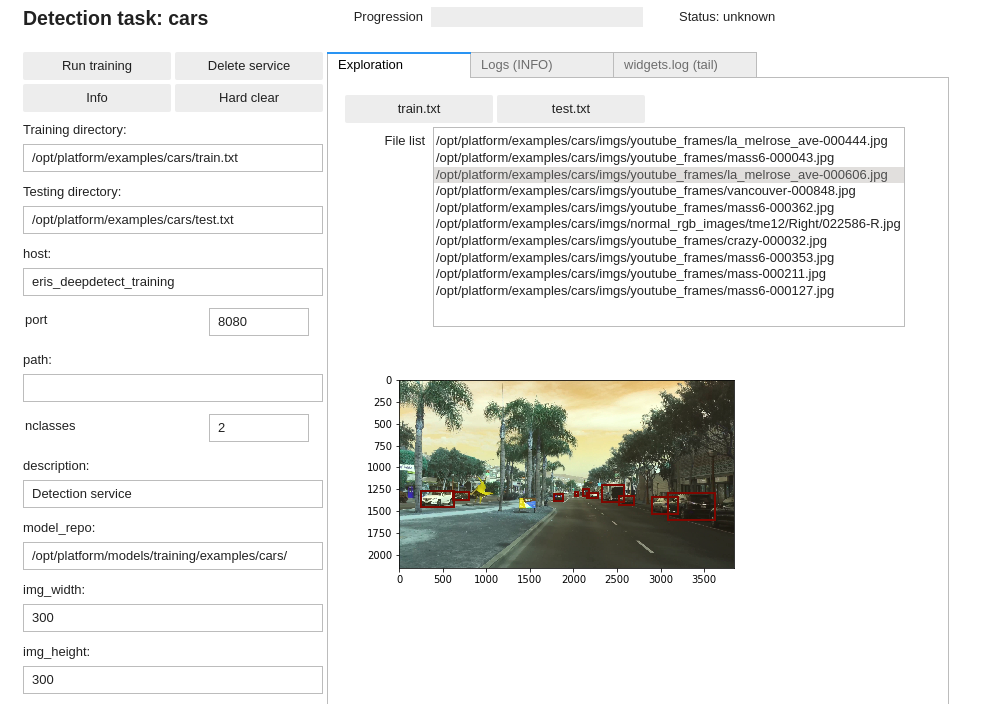
Training an object detector
Using the DD platform, from a JupyterLab notebook, start from the code on the right.
Object detection notebook snippet:
img_obj_detect = Detection(
  "cars",
  training_repo= "/opt/platform/examples/cars/train.txt",
  testing_repo= "/opt/platform/examples/cars/test.txt",
  host='deepdetect_training',
  port=8080,
  model_repo='/opt/platform/models/training/examples/cars/',
  img_width=300,
  img_height=300,
  db_width=512,
  db_height=512,
  snapshot_interval=500,
  test_interval=500,
  iterations=25000,
  template="ssd_300",
  mirror=True,
  rotate=False,
  finetune=True,
  weights="/opt/platform/models/pretrained/ssd_300/VGG_ILSVRC_16_layers_fc_reduced.caffemodel",
  batch_size=16,
  iter_size=2,
  test_batch_size=4,
  nclasses=2,
  base_lr=0.0001,
  solver_type="RMSPROP",
  gpuid=0
)
img_obj_detect
This prepares for training an object detector with the following parameters:
carsis the example job name
training_repospecifies the location of the data
templatespecifies an SSD-300 architecture that is fast and has good accuracy. See the recommended models section.img_widthandimg_heightspecify the input size of the image, see the recommended models section to adapt to other architectures available.db_widthanddb_heightspecify the image input size from which the data augmentation is applied during training. Typically zooming and distorsions yield more accurate and robust models. A good rule of thumb is to use roughly twice the size of the architecture input size (e.g. 300x300 -> 512x512 and 512x512 -> 1024x1024).
mirroractivates mirroring of inputs as data augmentation for both the input image and the bounding boxrotateactivates rotation of inputs as data augmentation for both the input image and the bounding box (e.g. useful for satellite images, …)finetuneautomatically prepares the network architecture for finetuningweightsspecifies the pre-trained model weights to start training fromsolver_typespecifies the optimizer, see https://deepdetect.com/api/#launch-a-training-job andsolver_typefor the many optionsbase_lrspecifies the learning rate. For finetuning object detection models, 1e-4 works well.gpuidspecifies which GPU to use, starting with number 0
Recommended models
The platform has many neural network architectures and pre-trained models built-in for object detection. These range from state of the art architectures like SSD, SSD with resnet tips, RefineDet for state of the art, to low-memory Squeezenet-SSD and Mobilenet-SSD.
Below is a list of recommended models for image classification from which to best choose for your task.
| Model | Image size | Recommendation | Pre-Trained (/opt/platform/models/pretrained) |
|---|---|---|---|
ssd_300 |
300x300 | Very Fast / Good accuracy / embedded & desktops | ssd_300/VGG_rotate_generic_detect_v2_SSD_rotate_300x300_iter_115000.caffemodel |
ssd_300_res_128 |
300x300 | Fast / Very good accuracy / desktops | ssd_300_res_128/VGG_fix_pretrain_ilsvrc_res_pred_128_generic_detect_v2_SSD_fix_pretrain_ilsvrc_res_pred_128_300x300_iter_184784.caffemodel |
ssd_512 |
512x512 | Fast / Very good accuracy / desktops | ssd_512/VGG_fix_512_generic_detect_v2_SSD_fix_512_512x512_iter_180000.caffemodel |
refinedet_512 |
512x512 | Fast / Excellent accuracy / desktops | refinedet_512/VOC0712_refinedet_vgg16_512x512_iter_120000.caffemodel |
squeezenet_ssd |
300x300 | Extremely Fast / Good accuracy / embedded | squeezenet_ssd/SqueezeNet_generic_detect_v2_SqueezeNetSSD_300x300_iter_200000.caffemodel |
Download the pretrained weights file for these models: https://www.deepdetect.com/downloads/platform/pretrained/
For a full list of available templates and models, see https://github.com/jolibrain/deepdetect/blob/master/README.md#models